
I recently audited around 20 dental websites across Canada and the US, and the same problems kept showing up on almost every one. In this guide I want to share what I found, along with a few insights from my own work, so you can see why your clinic site might be missing from the results your patients are actually searching for.
A quick introduction first. I am Priya, a local SEO strategist and the founder of PG Digital Marketing. I have spent more than seven years helping local businesses get found by the people looking for exactly what they offer.
Here is the honest short answer. Your dental website probably isn’t ranking well because it is missing several key pieces. Either Google’s crawlers cannot read it properly, or there isn’t enough trustworthy content for Google to rank it with confidence, or both things are happening at once.
At the end of this guide I have attached a checklist you can work through one item at a time. It will help you start lifting your rankings this week, even if marketing is not your main job.
Common Reasons Your Dental Website is Hidden
Before we get into the detail, here are the usual suspects I see again and again:
- Poor mobile speed. Your site loads slowly on phones, and most of your patients are searching on phones.
- The site is not indexed or is blocked. Google either hasn’t added your pages to its index or has been told to stay away.
- Thin or missing service pages. You offer implants, root canals, and Invisalign, but there is no real page for any of them.
- An unoptimized homepage. The page never clearly states who you are, what you do, and where you do it.
- No supporting informational content. There are no helpful articles that show Google you know your subject, so your site never builds topical authority.
Any one of these can hold you back. Most struggling sites have three or four at the same time.
What It Really Means When Your Dental Clinic Website Doesn’t Appear on Google
Rankings are not a vanity metric. When your site sits on page three, it quietly costs you real patients every day. Here is what that looks like in practice.
No online bookings coming from the website. If people cannot find you, they cannot book with you. Your site becomes a brochure that nobody opens instead of a steady source of new appointments.
You don’t rank for specific treatments. Someone typing “root canal treatment near me” or “emergency dentist in Calgary” is ready to book today. If your service pages are missing or weak, that high intent search goes to a competitor.
Your competitors collect the patients you should be seeing. The practice three blocks away might offer the same care you do, but if their site is set up properly, Google sends the calls their way. You feel the gap in your new patient numbers, even if you never see the search that caused it.
Now let’s get into why this happens and, more importantly, how to fix it.
Technical Glitches With Your Dental Website
This is where I start every audit, because a beautiful site means nothing if Google cannot read it.
Is your site even indexed?
Type site:yourdomain.com into Google. If almost nothing shows up, Google has not properly added your pages. A common cause is a stray “noindex” tag left in by a developer, or a robots.txt file that blocks crawling.
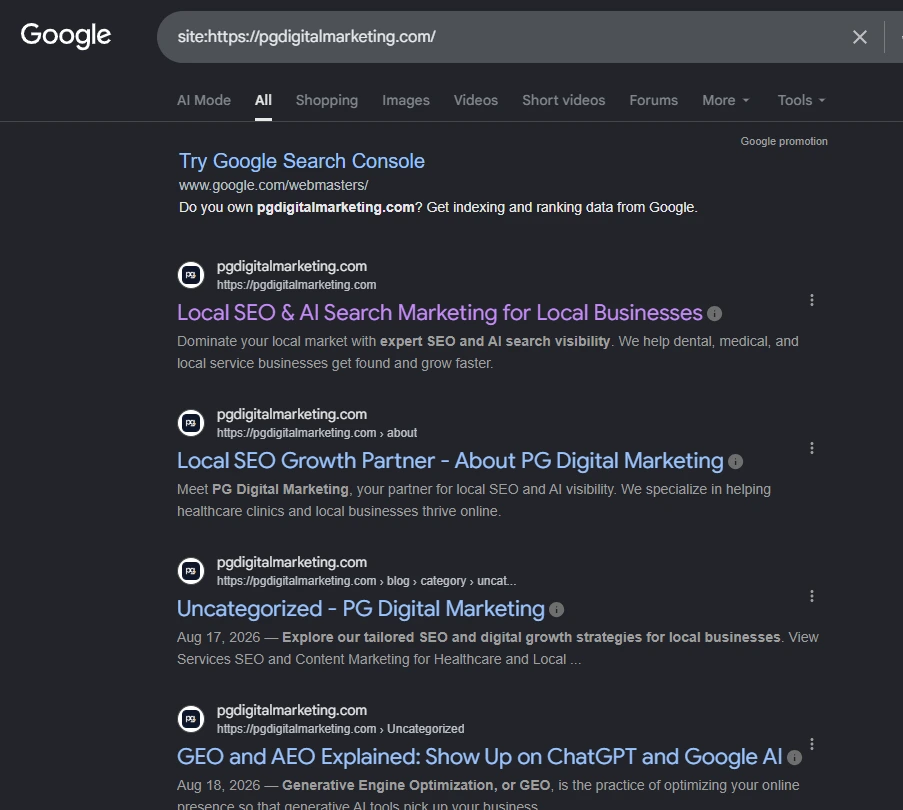
What to do: Open Google Search Console (it is free), go to the Pages report, and look for pages marked “Not indexed.” It will usually tell you the exact reason.
Pro tip: After a site redesign, developers often forget to remove the “Discourage search engines” setting. I have found this single checkbox burying entire practices. It takes thirty seconds to check and can undo months of invisibility.
Your mobile speed is dragging
Google ranks the mobile version of your site first, and a heavy homepage full of large images will crawl on a phone. Slow load times push visitors away and signal to Google that the experience is poor.
What to do: Run your homepage through Google’s PageSpeed Insights. Aim to compress oversized images, remove plugins you no longer use, and choose reliable hosting. Focus on the three Core Web Vitals: loading speed, responsiveness, and visual stability.
Broken links and messy redirects.
When old pages return errors or bounce through several redirects, both patients and crawlers get lost.
What to do: Fix or redirect any page that returns a 404 error, and make sure your site loads over a secure HTTPS connection with the padlock icon.
Content Issues With Your Dental Clinic Website
Once Google can read your site, it needs a reason to rank it. That reason is content.
Your homepage tries to do everything.
Many dental homepages open with a stock photo and a vague welcome line, then never state the actual services or the city. Google reads that page and has no idea what to rank you for.
What to do: Put a clear H1 at the top that names your service and your location, written for humans. Something like “Family and Cosmetic Dentistry in Ottawa” tells both Google and the patient exactly what they found.
You are missing real service pages.
A single “Services” page that lists twelve treatments in one paragraph will not rank for any of them. Google prefers one focused page per major service.
What to do: Build a dedicated page for each core treatment: dental implants, root canal treatment, Invisalign, teeth whitening, emergency care, and so on. Give each page a few hundred words that answer the real questions patients ask, such as what the visit involves, whether it hurts, and roughly what to expect on cost.
Pro tip: Add your city naturally into these pages, but do not stuff it. “Dental implants in Vancouver” once in the heading and once in the body reads well. The same phrase ten times reads like spam, and Google notices.
No supporting articles to build trust.
Service pages sell. Informational articles build authority. When you answer common questions in plain language, Google starts to see your site as a genuine source on dental topics.
What to do: Write short, helpful posts around real patient questions, for example “How long does a dental crown last?” or “What to do in a dental emergency.” Each one gives Google another reason to trust and rank your whole domain.
Weak Local Signals
Dental care is local. Nobody flies across the country for a cleaning, so Google leans heavily on local signals to decide who appears in the map results.
Google ranks local results on three ideas: relevance (do you offer what was searched), distance (how close you are to the searcher), and prominence (how established and trusted you appear online). Your Google Business Profile feeds all three, but your website has to back it up. When your profile says one thing and your site says nothing, Google has less reason to trust you.
Your Google Business Profile
Your Google Business Profile is the single biggest local lever. For many searches, the map pack of three listings sits above the regular results and takes most of the clicks. If your profile is unclaimed, incomplete, or wrongly categorized, you are invisible where it matters most.
What to do: Claim and verify your Google Business Profile. Set the primary category to “Dentist” and add relevant secondary categories like “Cosmetic dentist” or “Orthodontist” where they apply. Fill in your hours, services, and photos of the actual practice.
Pro tip: Reviews carry real weight, and so does replying to them. A steady flow of recent reviews, each answered politely, tells Google your practice is active and trusted. Ask happy patients at the front desk, and make it easy with a short link or a QR code.
What Your Website Needs for Stronger Local Targeting
Your profile tells Google where you are. Your website has to prove it. These are the on site pieces I check on every audit.
Put your city where Google looks first. If your location only appears in the footer, you are relying on Google to guess. Work your primary city into your homepage H1, title tag, meta description, and the first paragraph of your main pages, written naturally for patients.
What to do: Aim for a homepage title along the lines of “Family and Cosmetic Dentistry in Ottawa | Your Practice Name.” Then repeat the city once inside the opening lines so it reads like a real sentence, not a keyword drop.
Build a proper location or contact page. This page should carry your full name, address, and phone number in text (not baked into an image), plus your hours and parking or transit notes. Google reads this as a strong confirmation of where you are.
What to do: Add your NAP as real text, embed a Google Map of the practice, and link to this page from your main navigation so it is easy to find.
Pro tip: Match the NAP on this page word for word with your Google Business Profile. Even a “Suite 200” versus “#200” difference chips away at Google’s confidence.
Create city pages if you serve more than one area. A practice drawing patients from several suburbs or towns benefits from a dedicated page for each, as long as each page is genuinely useful and not a copy with the city name swapped.
What to do: Give each area page unique content: local landmarks near the office, directions from that neighborhood, and the services patients there ask about most. Thin, duplicated city pages can hurt you, so only build them where you truly serve.
Mention your community naturally. References to nearby neighborhoods, schools, or landmarks help Google connect your practice to a real place. A short blog post about a local event you sponsored or a neighborhood you serve does more for local relevance than most people expect.
What to do: Weave real local detail into service and blog pages where it fits. Keep it honest and specific to your area rather than generic.
Add LocalBusiness details in your schema. Your Dentist schema (covered in the next section) should include your city, region, and service area so search engines can read your location cleanly, not just infer it from your text.
NAP Inconsistency and Missing Citations
NAP stands for Name, Address, and Phone number. It sounds small, but it quietly breaks local rankings for a lot of practices.
The problem: Your clinic is listed across the web with slightly different details. One directory has an old phone number, another spells your street as “St.” instead of “Street,” and a third still shows your previous suite number. Google sees these mismatches and loses confidence that your business information is correct.
What to do: Pick one exact format for your name, address, and phone number, then use it everywhere without variation. Copy it into a document and treat it as the single correct version.
Missing citations: A citation is any online mention of your NAP, usually in a business directory. Fewer quality citations means fewer trust signals for Google.
What to do: Make sure your practice is listed consistently on the major directories: Google Business Profile, Bing Places, Apple Business Connect, Yelp, and healthcare listings such as Healthgrades. In Canada, add relevant local and provincial directories too.
Pro tip: Before building new citations, clean up the old ones. Correcting three wrong listings often does more good than adding ten new ones, because you are removing the confusion rather than adding to it.
Wrong or Missing Schema Markup
Schema markup is a small piece of code that spells out your business details in a language search engines read easily. Think of it as adding clear labels to your information so Google never has to guess.
Most dental sites I audit have none of it, which means they miss an easy chance to stand out.
What to do: Add “Dentist” schema (a recognized type under LocalBusiness) to your homepage. It should include your practice name, address, phone number, opening hours, and geographic area. Add FAQ schema to pages where you answer common questions, since this can help those answers appear directly in search results.
Pro tip: After adding schema, run the page through schema validator test to confirm it reads correctly. Broken or invalid schema can quietly do more harm than none at all, so always validate before you move on.
Checklist To Fix Your Dental Clinic Website Quickly
Work through these in order. You can tick each one off as you go.
Technical:
☐ Check indexing by typing site:yourdomain.com into Google.
☐ Open Google Search Console and review the Pages report for “Not indexed” pages.
☐ Remove any accidental “noindex” tag.
☐ Confirm robots.txt is not blocking important pages.
☐ Confirm the “Discourage search engines” setting is switched off.
☐ Run your homepage through Google PageSpeed Insights.
☐ Compress large images and remove unused plugins.
☐ Fix 404 errors and clean up redirect chains.
☐ Confirm the site loads over secure HTTPS with the padlock.
Content:
☐ Write a clear homepage H1 with your service and city.
☐ Add a unique title tag and meta description to the homepage.
☐ Create one dedicated page for each core treatment.
☐ Add your city naturally to service pages, without stuffing.
☐ Publish helpful articles or blogs every week answering patient questions.
Local signals and Google Business Profile:
☐ Claim and verify your Google Business Profile.
☐ Set the primary category to “Dentist” and add relevant secondary categories.
☐ Complete your hours, services, and real photos of the practice.
☐ Ask patients for reviews and reply to every one.
NAP and citations:
☐ Choose one exact NAP format and save it as your master version.
☐ Match that NAP across your website and every listing.
☐ Correct any wrong existing directory listings.
☐ Add listings on Bing Places, Apple Business Connect, Yelp, and Healthgrades.
☐ Add relevant local and provincial directories where they apply.
Schema:
☐ Add Dentist schema to your homepage.
☐ Add FAQ schema to your question and answer pages.
☐ Validate everything with Google’s Rich Results Test.
Frequently Asked Questions
Usually because Google either cannot crawl and index the site properly or does not find enough clear, trustworthy content to rank it. Technical blocks, thin service pages, and a weak Google Business Profile are the most common culprits, and they often appear together.
Reviews are only one signal. A competitor with fewer or lower reviews can still win if their site loads faster, has proper service pages, uses consistent NAP details, and has a fully optimized Google Business Profile. Google weighs the whole picture, not just the star rating.
A brand new site usually starts appearing within a few weeks once it is indexed, but meaningful local rankings often take six months. The timeline depends on your competition, the strength of your content, and how consistent your local signals are. Steady, correct work compounds over time.
Ready to See Where Your Site Stands?
If any of this sounds like your website, you are not alone, and none of it is hard to fix once you know where to look. At PG Digital Marketing we do this every day for dental practices across the US and Canada.
If you would like a friendly, no pressure look at what is holding your site back, book a free growth call with our team. We will walk through your site together and show you the quickest wins, whether you work with us afterward or not.